
이번 포스트에선 안전하지 않은 데이터 스토리지라는 파트를 풀어볼 것이다.
파트가 4개로 나뉘어져 있는데 이 중 4번째는 SD카드를 요구하기에 따로 안 건들거다.
# 문제 풀이 - 1
계정 정보가 Shared Preferences에 저장된다. 이는 앱용 DB라고 보면 된다.
    public void saveCredentials(View view) {
        SharedPreferences spref = PreferenceManager.getDefaultSharedPreferences(this);
        SharedPreferences.Editor spedit = spref.edit();
        EditText usr = (EditText) findViewById(R.id.ids1Usr);
        EditText pwd = (EditText) findViewById(R.id.ids1Pwd);
        spedit.putString("user", usr.getText().toString());
        spedit.putString("password", pwd.getText().toString());
        spedit.commit();
        Toast.makeText(this, "3rd party credentials saved successfully!", 0).show();
    }
앱은 /data/data 디렉토리에 각자의 이름으로 디렉토리를 생성하는데, 이 내에 SharedPreferences 라는 디렉토리가 있다. 이는 오직 해당 앱만 접근 가능하도록 권한 설정되어 있다.
shared_prefs 디렉토리에 크리덴셜 저장됨.. 끝.

# 문제 풀이 - 2
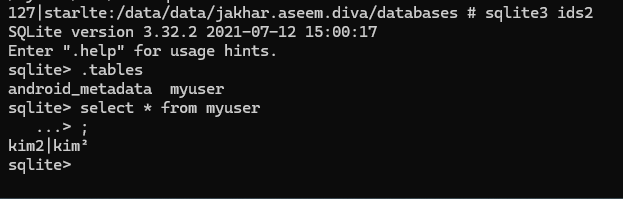
ids2라는 DB 생성 후 여기에 계정 정보를 저장한다.
protected void onCreate(Bundle savedInstanceState) throws SQLException {
    super.onCreate(savedInstanceState);
    try {
        this.mDB = openOrCreateDatabase("ids2", 0, null);
        this.mDB.execSQL("CREATE TABLE IF NOT EXISTS myuser(user VARCHAR, password VARCHAR);");
    } catch (Exception e) {
        Log.d("Diva", "Error occurred while creating database: " + e.getMessage());
    }
    setContentView(R.layout.activity_insecure_data_storage2);
}

public void saveCredentials(View view) throws SQLException {
    EditText usr = (EditText) findViewById(R.id.ids2Usr);
    EditText pwd = (EditText) findViewById(R.id.ids2Pwd);
    try {
        this.mDB.execSQL("INSERT INTO myuser VALUES ('" + usr.getText().toString() + "', '" + pwd.getText().toString() + "');");
        this.mDB.close();
    } catch (Exception e) {
        Log.d("Diva", "Error occurred while inserting into database: " + e.getMessage());
    }
    Toast.makeText(this, "3rd party credentials saved successfully!", 0).show();
}
앱 databases 디렉토리에 ids2라는 이름의 DB가 저장되어 있다. 여기 내 크리덴셜이 저장됐다. 끝.
# 문제 풀이 - 3
uinfo와 tmp 스트링을 받아서 File 함수로 파일을 생성하고 크리덴셜을 저장함.
public void saveCredentials(View view) throws IOException {
    EditText usr = (EditText) findViewById(R.id.ids3Usr);
    EditText pwd = (EditText) findViewById(R.id.ids3Pwd);
    File ddir = new File(getApplicationInfo().dataDir);
    try {
        File uinfo = File.createTempFile("uinfo", "tmp", ddir);
        uinfo.setReadable(true);
        uinfo.setWritable(true);
        FileWriter fw = new FileWriter(uinfo);
        fw.write(usr.getText().toString() + ":" + pwd.getText().toString() + "\n");
        fw.close();
        Toast.makeText(this, "3rd party credentials saved successfully!", 0).show();
    } catch (Exception e) {
        Toast.makeText(this, "File error occurred", 0).show();
        Log.d("Diva", "File error: " + e.getMessage());
    }
디렉토리에 남아 있음. 끝.

# 보안대책
크리덴셜... 클라이언트 단에 저장하지마... 자동 로그인 구현하지마... 암호화해서 저장해도 안돼... 그냥 하지마
'모바일 > DIVA' 카테고리의 다른 글
| 취약 모바일 앱 DIVA - 6 (Access Control Issues Part 1 ~ Part 3) (1) | 2025.12.19 |
|---|---|
| 취약 모바일 앱 DIVA - 5 (Input Validation Issue Part 1 and 2) (0) | 2025.12.18 |
| 취약 모바일 앱 DIVA - 3 (Hardcoding issue Part 1 and Part 2) (0) | 2025.12.17 |
| 취약 모바일 앱 DIVA - 2 (Insecure Logging) (0) | 2025.12.17 |
| 취약 모바일 앱 DIVA - 1 (0) | 2025.12.17 |